Summary: The Mail system lets players send text, items, and Zeny to other characters. In Comodo Party, mail can only be sent and received while standing in a town, and each character is limited to 10 mails per day.
Accessing Mail
Mail is accessed through the in-game mailbox interface, available from the Basic Info window or by right-clicking a character.
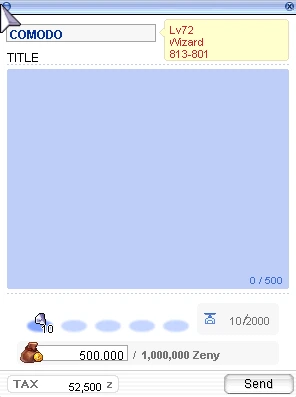
- You may send a mail by typing in the recipient's name and pressing Check to confirm the character exists.
- A mail title must be between 4 and 24 characters long, with an optional message body attached.
- If your character has unread mail, a notification icon will appear on your interface.
Note
-
Mail can only be sent or opened while your character is standing outdoors in a town, it won't work inside buildings such as houses, shops, or guild halls, even though those are still technically part of a town map.
-
Mailboxes will not respond while you are in the field, a dungeon, or an instance, but the notification icon still appears if you have unread mail, so you'll know it's waiting once you reach a town.
Interface
The Mail interface provides a simple way to access and manage in-game mail. Players can access the mailbox through the Basic Info window or by right-clicking a character.
The mail system includes the following interface elements:
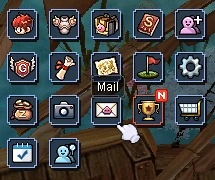
- Mail Icon: Indicates when you have unread mail and provides quick access to the Mail interface.
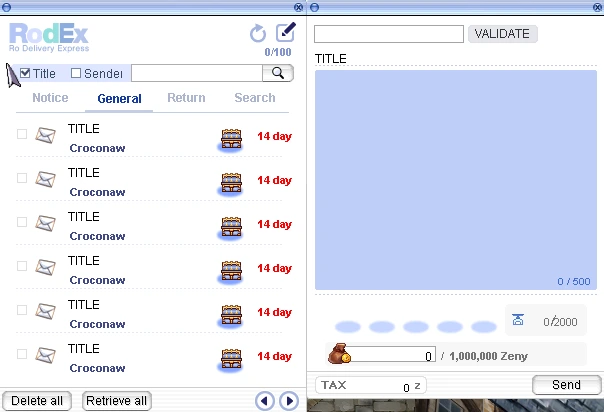
- Mail Interface: Displays your available mail and provides options to read, send, and manage messages.
- Send Mail: Allows you to enter a recipient, mail title, message, and attach items or Zeny.
Mail Icon
Mail Interface
How to Send
Sending Limits
| Limit | Amount |
|---|---|
| Mails sendable per day | 10 |
| Reset time | Every 24 hours |
| Mail fee | 10% |
| Mail attachment fee | 10,000 Zeny |
| Mail attachment weight limit | 2,000 |
| Mail return time | 15 days |
| Mail deletion time after return | 15 days |
Once you reach the daily sending limit, you will need to wait for the next reset before you can send additional mail. Receiving mail is not affected by this limit.
Attaching Items and Zeny
Mail can carry a message on its own, or be sent along with items and Zeny attached.
- Items and Zeny can only be attached or claimed while inside a town, in line with the sending and receiving restriction above.
- Recipients must open a mail to claim any attached items or Zeny before the message can be deleted.
Tip
- If your inventory is full or overweight, you may not be able to claim item attachments. Make sure you have room before opening mail with items attached.