Grouping
Grouping
Summary: Parties let a group of players hunt together, share EXP, and take on content that would be difficult solo. Comodo Party caps Even Share at a 15-level spread between members, beyond that the party automatically falls back to Each Take.
Creating a Party
To create a party, use the /organize "Party Name" command, or open the Party window and click Party Formed. The character who creates the party becomes the Party Leader.
- You must have Novice Basic Skill level 7 to create a party, and level 5 to join one.
- A party can hold up to 12 players.
- The Party Leader can remotely invite players using
/invite "Character Name", they don't need to be on the same map.
EXP Sharing
There are two EXP configurations a party can be set to:
| Mode | Description |
|---|---|
| Even Share | EXP earned from monsters is split evenly between all eligible party members, regardless of who landed the kill. |
| Each Take | Each member only earns EXP for monsters they personally damage. |
Info
- Even Share only works while all party members are within 15 Base Levels of each other.
- If the spread between the highest and lowest level member exceeds 15 levels, the party automatically switches to Each Take until the spread is back within range.
- EXP setup can be changed at any time by the Party Leader, as long as all online members currently qualify for the mode being set.
EXP Tap Bonus
When more than one player damages the same monster, the EXP awarded from that monster increases. This applies whether or not the tapping player is in your party.
- Each additional attacking player adds +25% EXP.
- The bonus counts up to 12 total attackers (11 additional beyond the first), for a maximum of 375% EXP.
- Only players who deal damage count as an attacker, non-damage skills do not add to the bonus.
View Tap Bonus table
| Total Attackers | Additional Attackers | Total EXP |
|---|---|---|
| 1 | 0 | 100% |
| 2 | 1 | 125% |
| 3 | 2 | 150% |
| 4 | 3 | 175% |
| 5 | 4 | 200% |
| 6 | 5 | 225% |
| 7 | 6 | 250% |
| 8 | 7 | 275% |
| 9 | 8 | 300% |
| 10 | 9 | 325% |
| 11 | 10 | 350% |
| 12 | 11 | 375% |
Party Size EXP Bonus
On top of Even Share or Each Take, a party also gets a flat EXP bonus based on how many other members are in it.
View Party Size Bonus table
| Party Size | Total Bonus | Calculation |
|---|---|---|
| 1 | 100% | 0% |
| 2 | 105% | 1 x 5% = 5% |
| 3 | 110% | 2 x 5% = 10% |
| 4 | 115% | 3 x 5% = 15% |
| 5 | 120% | 4 x 5% = 20% |
| 6 | 125% | 5 x 5% = 25% |
| 7 | 130% | 6 x 5% = 30% |
| 8 | 135% | 7 x 5% = 35% |
| 9 | 140% | 8 x 5% = 40% |
| 10 | 145% | 9 x 5% = 45% |
| 11 | 150% | 10 x 5% = 50% |
| 12 | 155% | 11 x 5% = 55% |
How These Bonuses Combine
The Tap Bonus and Party Size Bonus both apply to the same kill, multiplied together before the EXP is split among the party.
Example: 12 players, all attacking, 1000 base EXP monster
- Tap Bonus at 12 attackers: 375% -> 1000 x 3.75 = 3750 EXP
- Split evenly across 12 members: 3750 / 12 = 312.5 EXP each
- Party Size Bonus at 12 members: 155% -> 312.5 x 1.55 = 484.375 EXP per member
Even after splitting the reward 12 ways, each member still ends up with close to half the monster's original EXP, instead of the roughly 8.3% they'd get from an unbonused even split.
Item Sharing
Item Share can only be set when the party is first created:
| Mode | Description |
|---|---|
| Each Take | Only the player who lands the killing blow can pick up dropped items. |
| Party Share | Dropped items can be picked up by any nearby party member. |
Warning
Item Share settings are locked in at party creation. To change it, the party must be disbanded and remade.
Small Party Window
Rather than checking the full Party window (Alt + Z) every time, you can pin individual party members' HP bars and names directly onto your screen.
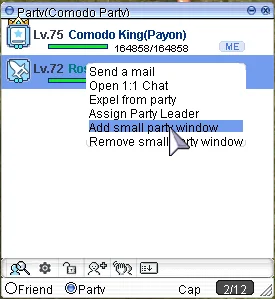
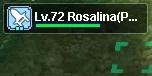
Choose which party members to display, they'll then appear as a small floating window over the game screen for quick reference.